Method Overloading vs Overriding in Java (With Examples)
backend
10 min read
Method Overloading vs Overriding in Java (With Examples)
Method overloading and overriding look similar but work completely differently. Here's a clear breakdown with code examples, a comparison table, and the rules that actually matter.
Published By: Nelson Djalo | Date: April 16, 2026
Table of Contents
- What Is Method Overloading in Java?
- Method Overloading Example
- What Is Method Overriding?
- Method Overriding Example
- Side-by-Side Comparison Table
- How the JVM Resolves Each One
- Common Mistakes and Gotchas
- When to Use Which
- FAQ
- Summary
What Is Method Overloading in Java?
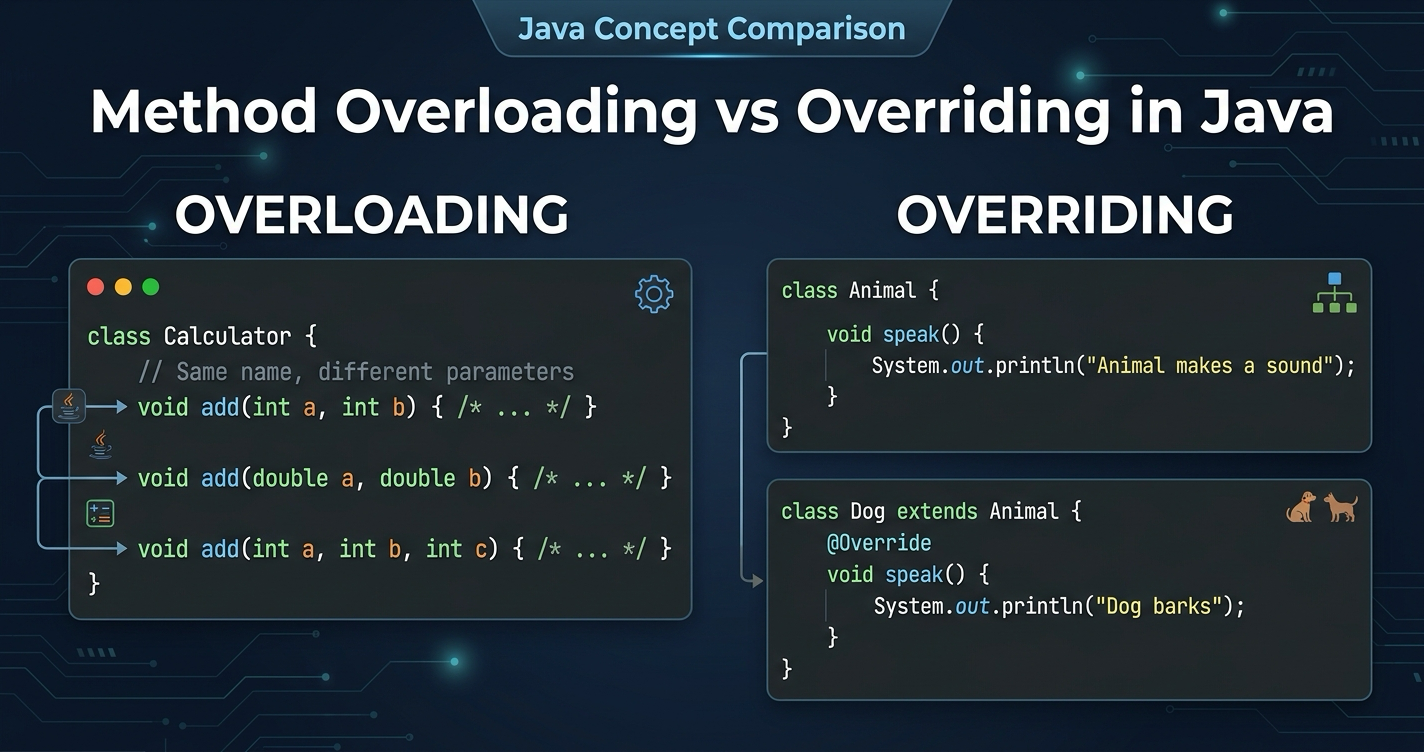
Method overloading in Java means defining multiple methods in the same class with the same name but different parameter lists. The compiler picks the right version to call based on the arguments you pass. Same name, different signatures - that's it.
You've already used overloading even if you didn't realize it. Every time you call System.out.println() with a String, an int, or a double, you're calling a different overloaded version of the same method.
The rules are straightforward:
- Methods must have the same name
- Methods must have different parameter lists (different types, different number of parameters, or different order of types)
- Return type alone is not enough to overload - the parameters must differ
Method Overloading Example
Let's build a Calculator class that handles different types of addition:
public class Calculator {

    public int add(int a, int b) {
        return a + b;
    }

    public double add(double a, double b) {
        return a + b;
    }

    public int add(int a, int b, int c) {
        return a + b + c;
    }

    public String add(String a, String b) {
        return a + b;
    }
}
All four methods are named add, but each takes different parameters. The compiler knows which one to call:
Calculator calc = new Calculator();

calc.add(2, 3);           // calls add(int, int) -> 5
calc.add(2.5, 3.5);       // calls add(double, double) -> 6.0
calc.add(1, 2, 3);        // calls add(int, int, int) -> 6
calc.add("Hello, ", "World"); // calls add(String, String) -> "Hello, World"
This is resolved at compile time. The compiler looks at the argument types and binds the call to the correct method before your code even runs. That's why overloading is sometimes called compile-time polymorphism or static polymorphism.
One important thing: you cannot overload by changing only the return type. This won't compile:
// This does NOT compile
public int calculate(int a) { return a * 2; }
public double calculate(int a) { return a * 2.0; }  // same parameters - compiler error
The compiler needs the parameter list to distinguish between overloaded methods. Return type isn't part of the method signature in Java.
If you're new to Java and want to build a solid foundation with these concepts, the Java for Beginners course covers methods, OOP, and polymorphism step by step.
What Is Method Overriding?
Method overriding happens when a subclass provides its own implementation of a method that's already defined in its parent class. The method in the child class must have the exact same signature - same name, same parameters, same return type (or a covariant return type).
Where overloading gives you multiple versions of a method in the same class, overriding lets a subclass replace inherited behavior with something more specific.
The rules:
- The method must exist in the parent class
- The child method must have the same signature (name + parameters)
- The access modifier cannot be more restrictive (e.g., you can't override a
publicmethod asprivate) - The child method cannot throw broader checked exceptions than the parent
static,final, andprivatemethods cannot be overridden
Method Overriding Example
Here's a classic example with a Notification system:
public class Notification {

    private String message;

    public Notification(String message) {
        this.message = message;
    }

    public void send() {
        System.out.println("Sending notification: " + message);
    }

    public String getMessage() {
        return message;
    }
}
Now subclasses override send() to deliver notifications differently:
public class EmailNotification extends Notification {

    private String emailAddress;

    public EmailNotification(String message, String emailAddress) {
        super(message);
        this.emailAddress = emailAddress;
    }

    @Override
    public void send() {
        System.out.println("Sending email to " + emailAddress + ": " + getMessage());
    }
}

public class SmsNotification extends Notification {

    private String phoneNumber;

    public SmsNotification(String message, String phoneNumber) {
        super(message);
        this.phoneNumber = phoneNumber;
    }

    @Override
    public void send() {
        System.out.println("Sending SMS to " + phoneNumber + ": " + getMessage());
    }
}
The magic happens at runtime:
Notification notification = new EmailNotification("Your order shipped", "user@example.com");
notification.send();  // "Sending email to user@example.com: Your order shipped"

notification = new SmsNotification("Your order shipped", "+1234567890");
notification.send();  // "Sending SMS to +1234567890: Your order shipped"
Even though the variable type is Notification, the JVM calls the overridden method in the actual object's class. This is runtime polymorphism (or dynamic dispatch) - the decision happens while the program is running, not at compile time.
Always use the @Override annotation. It tells the compiler "I intend to override a parent method." If you misspell the method name or get the parameters wrong, the compiler will catch it immediately instead of silently creating a new method.
Side-by-Side Comparison Table
| Feature | Method Overloading | Method Overriding |
|---|---|---|
| Where | Same class (or inherited) | Subclass overrides parent method |
| Method name | Same | Same |
| Parameters | Must be different | Must be the same |
| Return type | Can be different | Must be same (or covariant) |
| Access modifier | Can be anything | Cannot be more restrictive |
| static methods | Can be overloaded | Cannot be overridden |
| final methods | Can be overloaded | Cannot be overridden |
| private methods | Can be overloaded | Cannot be overridden |
| Resolution | Compile time (static binding) | Runtime (dynamic binding) |
| Polymorphism type | Compile-time (static) | Runtime (dynamic) |
| @Override annotation | Not used | Should always be used |
The simplest way to remember: overloading is about different parameters, overriding is about different classes.
How the JVM Resolves Each One
Understanding when each gets resolved clears up a lot of confusion.
Overloading - compile time. The Java compiler looks at the method name and the argument types at the call site. It picks the most specific matching method and hard-codes that choice into the bytecode. By the time the JVM runs your code, the decision is already made.
public void process(Object obj)  { System.out.println("Object"); }
public void process(String str)  { System.out.println("String"); }

process("hello");  // Prints "String" - compiler picks the more specific match
Overriding - runtime. The JVM uses dynamic dispatch. It looks at the actual class of the object (not the declared type of the variable) and calls that class's version of the method. This is what makes polymorphism work - you can write code against a parent type and have child behavior kick in automatically.
Notification n = new EmailNotification("Hi", "test@test.com");
n.send();  // JVM sees the object is an EmailNotification, calls its send()
This distinction matters when you start combining both. You can have overloaded methods in a parent class, and a child class can override one specific overloaded version. The compiler resolves the overload first, then the JVM resolves the override at runtime.
Common Mistakes and Gotchas
Mistake 1: Thinking you're overriding but you're actually overloading.
public class Parent {
    public void print(String message) {
        System.out.println(message);
    }
}

public class Child extends Parent {
    // This is overLOADING, not overriding - different parameter type
    public void print(int number) {
        System.out.println(number);
    }
}
Without @Override, this compiles fine but doesn't do what you expect. The child has two methods: print(String) from the parent and print(int) that it added. No override happened.
Mistake 2: Trying to override a static method.
public class Parent {
    public static void greet() {
        System.out.println("Hello from Parent");
    }
}

public class Child extends Parent {
    // This is method HIDING, not overriding
    public static void greet() {
        System.out.println("Hello from Child");
    }
}

Parent p = new Child();
p.greet();  // Prints "Hello from Parent" - no dynamic dispatch for static methods
Static methods belong to the class, not to instances. What looks like overriding is actually method hiding, and it doesn't support polymorphism.
Mistake 3: Narrowing the access modifier.
public class Parent {
    public void doSomething() { }
}

public class Child extends Parent {
    // Compiler error - cannot reduce visibility from public to protected
    @Override
    protected void doSomething() { }
}
You can widen access (protected to public) but never narrow it. This preserves the Liskov Substitution Principle - any code that works with the parent type should also work with a child instance.
When to Use Which
Use overloading when you need the same operation to work with different input types or different numbers of arguments. Think of it as convenience - instead of addInts(), addDoubles(), and addThreeInts(), you just have add() with different parameter lists.
Use overriding when you need subclasses to customize or replace inherited behavior. This is the heart of OOP polymorphism - writing code against abstractions and letting concrete implementations vary.
In practice, overloading is a design convenience. Overriding is a design pattern. You'll use both constantly, but overriding is what makes inheritance and polymorphism actually useful in real applications.
FAQ
Can I overload a method in a subclass?
Yes. A subclass can add new overloaded versions of a parent method. The subclass would then have both the inherited method and its own new version with different parameters.
Can I call the parent's method from an overridden method?
Yes, use super.methodName(). This is common when you want to extend behavior rather than fully replace it:
@Override
public void send() {
    super.send();  // do the parent's logic first
    System.out.println("Also logging to audit trail.");
}
Does overloading work with varargs?
Yes, but be careful. Varargs (int... numbers) can cause ambiguity with other overloaded versions. The compiler might not be able to decide which method to call, leading to compilation errors.
What is covariant return type in overriding?
A covariant return type means the overriding method can return a subtype of the parent method's return type:
public class Parent {
    public Number getValue() { return 42; }
}

public class Child extends Parent {
    @Override
    public Integer getValue() { return 42; }  // Integer is a subtype of Number
}
Can constructors be overloaded or overridden?
Constructors can be overloaded (same class, different parameters) but cannot be overridden since they're not inherited.
Summary
Method overloading in Java gives you multiple methods with the same name but different parameters, resolved at compile time. Method overriding lets a subclass replace an inherited method with its own implementation, resolved at runtime. Overloading is about convenience, overriding is about polymorphism.
The key things to remember: overloading requires different parameter lists, overriding requires the same signature across parent and child classes. Use @Override every time you override. Static, final, and private methods cannot be overridden.
Want to practice these concepts hands-on? The Java for Beginners course has exercises and coding challenges that let you build real projects using method overloading, overriding, and other core OOP patterns.
Related Articles

9 Books That Made Me a Better Software Engineer (Not the Usual List)
Skip the generic recommendations. These 9 books changed how I write code, lead teams, and think about systems - from Clean Code to books most devs haven't heard of.

How to Become a Java Full Stack Developer in 2025 (Step-by-Step)
The exact skills, tools, and learning order to go from zero to hired as a Java full stack developer. Covers Spring Boot, React, databases, Docker, and what employers actually look for.
Abstract Class in Java (With Real-World Examples)
Abstract classes in Java are one of the most misunderstood OOP concepts. Here's a practical guide with real-world examples, code you can actually use, and the mistakes most devs make.
Your Career Transformation Starts Now
Join thousands of developers mastering in-demand skills with Amigoscode. Try it free today.