Fix CORS Errors in Spring Boot (3 Ways)
backend
9 min read
Fix CORS Errors in Spring Boot (3 Ways)
Stop fighting CORS errors in Spring Boot. Learn three proven fixes, when to use each, and the production best practices senior devs rely on.
Published By: Nelson Djalo | Date: April 19, 2026
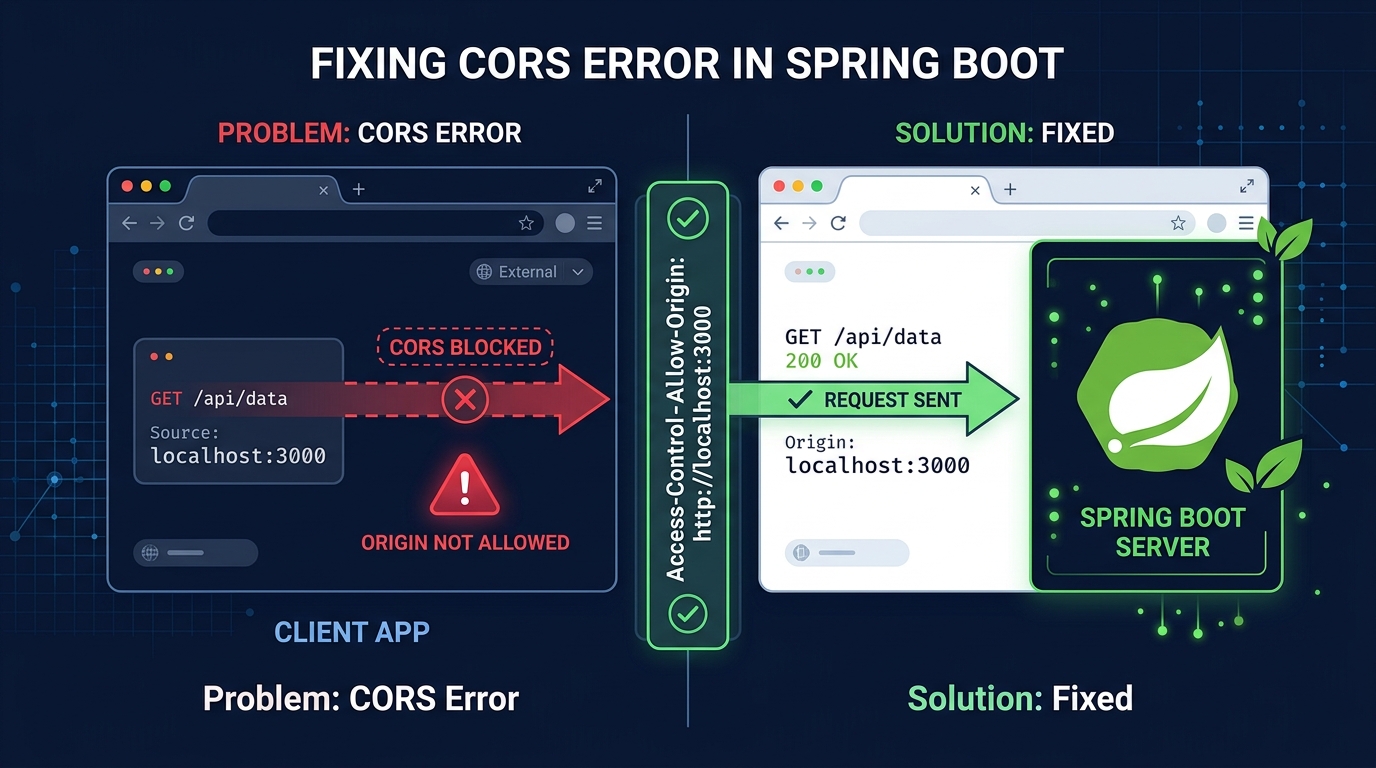
You ship your React frontend, point it at your Spring Boot API, hit refresh, and the console lights up red: Access to fetch at 'http://localhost:8080/api/users' from origin 'http://localhost:3000' has been blocked by CORS policy. If you've ever worked with a split frontend and backend, you've met this error. The good news is that spring boot cors handling is well-supported out of the box - you just need to pick the right tool for the job.
In this guide, I'll walk through what CORS actually is (briefly - no ten-paragraph primers here), why your requests are getting blocked, and three different ways to fix it in Spring Boot. We'll cover the quick @CrossOrigin annotation, a global WebMvcConfigurer setup, and the trickier case of wiring CORS into Spring Security. By the end, you'll know exactly which approach fits your project and how to avoid the mistakes that burn most developers the first time around.
Table of Contents
- What CORS Actually Is (In 60 Seconds)
- Why Your Spring Boot App Is Throwing CORS Errors
- Fix 1: The @CrossOrigin Annotation
- Fix 2: Global Config with WebMvcConfigurer
- Fix 3: CORS with Spring Security (The One Everyone Gets Wrong)
- Production Best Practices
- Common Mistakes I See All the Time
- Summary
What CORS Actually Is (In 60 Seconds)
CORS stands for Cross-Origin Resource Sharing. It's a browser security mechanism - not a server one - that blocks JavaScript from making requests to a domain different from the one that served the page, unless the server explicitly says it's fine.
An "origin" is the combination of scheme + host + port. So http://localhost:3000 and http://localhost:8080 are different origins. Your React app running on 3000 trying to hit your Spring Boot API on 8080? That's cross-origin.
When the browser sees a cross-origin request, one of two things happens:
- Simple request - GET or POST with basic headers. Browser sends it, but checks the response for
Access-Control-Allow-Origin. If it's missing or doesn't match, the browser throws away the response and logs the CORS error. - Preflighted request - Anything with custom headers, JSON bodies with
Content-Type: application/json, or methods like PUT/DELETE. The browser fires anOPTIONSrequest first asking the server "hey, would you allow this?" before sending the real one.
Your Spring Boot server is happily returning data in both cases. The browser is the one refusing to let your frontend read it. That's why curl works fine but the browser doesn't - curl doesn't enforce CORS.
Why Your Spring Boot App Is Throwing CORS Errors
Spring Boot doesn't add CORS headers by default. If you haven't configured anything, every cross-origin request from a browser will fail. The fix is telling Spring Boot which origins, methods, and headers are allowed.
There are three main ways to do this, and the one you pick depends on your setup:
- A single controller or endpoint? Use
@CrossOrigin. - Whole app, no Spring Security? Use a
WebMvcConfigurer. - Spring Security in the mix? You need
CorsConfigurationSourcewired into your filter chain.
Let's go through each.
Fix 1: The @CrossOrigin Annotation
This is the quickest fix and the one most tutorials show first. You slap @CrossOrigin on a controller or a specific method and Spring handles the rest.
@RestController
@RequestMapping("/api/users")
@CrossOrigin(origins = "http://localhost:3000")
public class UserController {

    @GetMapping
    public List<User> getAllUsers() {
        return userService.findAll();
    }

    @PostMapping
    public User createUser(@RequestBody User user) {
        return userService.save(user);
    }
}
You can also put it on individual methods if only some endpoints need to be cross-origin accessible:
@GetMapping("/public")
@CrossOrigin(origins = "https://app.example.com")
public List<Product> getPublicProducts() {
    return productService.findPublic();
}
Want to customize further? The annotation takes several arguments:
@CrossOrigin(
    origins = {"http://localhost:3000", "https://app.example.com"},
    methods = {RequestMethod.GET, RequestMethod.POST},
    allowedHeaders = {"Authorization", "Content-Type"},
    maxAge = 3600
)Pros: Dead simple, works for quick prototypes, lets you be surgical about which endpoints allow cross-origin access.
Cons: Doesn't scale. If you have twenty controllers, you'll have twenty annotations that will eventually drift out of sync. It also doesn't play nicely with Spring Security - the security filter runs before your controllers, so if Security blocks the preflight OPTIONS request, your @CrossOrigin never even gets a chance to respond.
Use this for small apps or when you genuinely want per-endpoint granularity.
Fix 2: Global Config with WebMvcConfigurer
For most real applications, you want one place that defines your CORS policy. That's what WebMvcConfigurer is for.
@Configuration
public class CorsConfig implements WebMvcConfigurer {

    @Override
    public void addCorsMappings(CorsRegistry registry) {
        registry.addMapping("/api/**")
                .allowedOrigins("http://localhost:3000", "https://app.example.com")
                .allowedMethods("GET", "POST", "PUT", "DELETE", "OPTIONS")
                .allowedHeaders("*")
                .allowCredentials(true)
                .maxAge(3600);
    }
}
That's it. Every controller under /api/** now respects the same CORS rules. One file, one policy, done.
A couple of details worth knowing:
allowCredentials(true)is required if your frontend sends cookies orAuthorizationheaders. But when credentials are allowed, you cannot useallowedOrigins("*")- the browser will reject it. You have to list specific origins.maxAge(3600)tells the browser to cache the preflight response for an hour. Without it, you'll see an OPTIONS request before every single real request, which is wasteful.- If you need wildcard-like matching with credentials, use
allowedOriginPatterns("https://*.example.com")instead ofallowedOrigins.
Pros: Single source of truth, easy to reason about, works across all controllers.
Cons: If you're using Spring Security, WebMvcConfigurer alone is not enough. Security's filter chain runs before the MVC layer, and it'll reject preflight OPTIONS requests with a 401 before your CORS config can respond.
This is where most developers get stuck.
Fix 3: CORS with Spring Security (The One Everyone Gets Wrong)
If your app uses Spring Security - and most real apps do - you need to tell Security about CORS explicitly, or preflight requests will die at the auth filter.
Here's the modern, lambda-style config:
@Configuration
@EnableWebSecurity
public class SecurityConfig {

    @Bean
    public SecurityFilterChain filterChain(HttpSecurity http) throws Exception {
        http
            .cors(cors -> cors.configurationSource(corsConfigurationSource()))
            .csrf(csrf -> csrf.disable())
            .authorizeHttpRequests(auth -> auth
                .requestMatchers("/api/auth/**").permitAll()
                .anyRequest().authenticated()
            )
            .sessionManagement(sm -> sm.sessionCreationPolicy(SessionCreationPolicy.STATELESS));

        return http.build();
    }

    @Bean
    public CorsConfigurationSource corsConfigurationSource() {
        CorsConfiguration config = new CorsConfiguration();
        config.setAllowedOrigins(List.of(
            "http://localhost:3000",
            "https://app.example.com"
        ));
        config.setAllowedMethods(List.of("GET", "POST", "PUT", "DELETE", "OPTIONS"));
        config.setAllowedHeaders(List.of("Authorization", "Content-Type", "X-Requested-With"));
        config.setExposedHeaders(List.of("Authorization"));
        config.setAllowCredentials(true);
        config.setMaxAge(3600L);

        UrlBasedCorsConfigurationSource source = new UrlBasedCorsConfigurationSource();
        source.registerCorsConfiguration("/**", config);
        return source;
    }
}
Two things are doing the heavy lifting here:
.cors(cors -> cors.configurationSource(corsConfigurationSource()))in your security chain tells Spring Security to apply CORS as an early filter, so preflight requests get the right response before auth kicks in.- The
CorsConfigurationSourcebean defines the actual rules.
Without step 1, step 2 does nothing for secured endpoints. I've debugged this exact issue on countless projects - someone adds a CorsConfigurationSource bean, assumes Spring Security will pick it up automatically, and can't figure out why preflights still 401. You have to wire it in.
If you want to go deeper on building production APIs with Spring Security, CORS, and JWT properly integrated, the Building APIs with Spring Boot course walks through the full setup end-to-end.
Production Best Practices
Getting CORS working locally is one thing. Keeping it secure and sane in production is another. Here's what I'd push for on any serious codebase:
Never use * in production. I know it's tempting when you just want the errors to stop. Don't. allowedOrigins("*") means every website on the internet can hit your API from a user's browser. If you're doing auth via cookies or headers, it's not just bad practice - the browser will outright refuse the request anyway.
Load origins from config, not hardcoded. Your dev, staging, and prod origins are different. Externalize them:
@Value("${app.cors.allowed-origins}")
private List<String> allowedOrigins;
And in application.yml:
app:
  cors:
    allowed-origins:
      - https://app.example.com
      - https://admin.example.com
Be explicit about methods and headers. Listing "*" for headers is fine during development but tighten it up before going live. Usually you only need Authorization, Content-Type, and maybe X-Requested-With.
Set maxAge. Somewhere between 1 hour and 24 hours. Without it, preflight requests fire constantly and slow down your frontend.
Handle credentials deliberately. If you use cookies for auth, allowCredentials(true) is required, and your frontend must send credentials: 'include'. If you use bearer tokens in headers, you may not need credentials at all.
Common Mistakes I See All the Time
A few patterns that burn teams repeatedly:
Mixing @CrossOrigin annotations with global config. They fight each other, and which one wins depends on load order. Pick one approach and stick with it.
Forgetting the OPTIONS method. If you list only GET, POST, PUT, DELETE, preflight requests will fail because OPTIONS isn't allowed. Include it explicitly or use the methods array that covers it.
Setting allowCredentials(true) with allowedOrigins("*"). The browser enforces that this combination is invalid. You'll see CORS errors even though your server thinks everything is fine. Switch to specific origins or use allowedOriginPatterns.
CORS config without Spring Security hookup. Already covered above - but worth repeating. If you're using Security, .cors(...) in your filter chain is not optional.
Thinking CORS is a server problem. The server isn't blocking anything. The browser is. Your curl tests passing means nothing for CORS. Test in the browser.
Treating CORS as authentication. CORS isn't auth. It's there to stop a malicious site from reading your API's data in a user's browser. It does nothing to stop someone hitting your API directly from a script or Postman. Your auth layer still matters just as much.
Summary
Spring Boot CORS comes down to three options, each with its place. @CrossOrigin is fine for small apps or one-off endpoints but doesn't scale. WebMvcConfigurer gives you one clean config for the whole app when you're not using Spring Security. Once Security is in play, you need a CorsConfigurationSource bean wired into your SecurityFilterChain - miss that step and preflight OPTIONS requests will 401 every time.
For production, always list specific origins, externalize them via config, include OPTIONS in your allowed methods, set maxAge to cache preflights, and be careful with allowCredentials. Most CORS pain comes from combining the wrong patterns - pick one approach, apply it consistently, and the red errors stop.
Once you've got CORS sorted, your frontend and Spring Boot backend play nicely together and you can get back to shipping features instead of fighting browser security dialogs.
Related Articles

9 Books That Made Me a Better Software Engineer (Not the Usual List)
Skip the generic recommendations. These 9 books changed how I write code, lead teams, and think about systems - from Clean Code to books most devs haven't heard of.

How to Become a Java Full Stack Developer in 2025 (Step-by-Step)
The exact skills, tools, and learning order to go from zero to hired as a Java full stack developer. Covers Spring Boot, React, databases, Docker, and what employers actually look for.
Abstract Class in Java (With Real-World Examples)
Abstract classes in Java are one of the most misunderstood OOP concepts. Here's a practical guide with real-world examples, code you can actually use, and the mistakes most devs make.
Your Career Transformation Starts Now
Join thousands of developers mastering in-demand skills with Amigoscode. Try it free today.