Spring Boot + MongoDB CRUD Tutorial
backend
7 min read
Spring Boot + MongoDB CRUD Tutorial
Build a full CRUD REST API with Spring Boot and MongoDB in under an hour. Docker setup, repositories, custom queries, pagination, and Testcontainers - all in one place.
Published By: Nelson Djalo | Date: April 9, 2026
Most Spring Boot tutorials default to Postgres or MySQL, but half the job listings on LinkedIn right now mention MongoDB. If your data is nested, schema-flexible, or changes shape every sprint, a document database will save you from migration hell. This post walks through a full CRUD REST API with Spring Boot and MongoDB - Docker setup, repositories, custom queries, pagination, and tests.
Table of Contents
- Why MongoDB With Spring Boot
- Setting Up MongoDB With Docker
- Adding the Dependencies
- Configuring application.yml
- Creating the Product Entity
- MongoRepository - CRUD For Free
- Custom Queries With @Query
- MongoTemplate For Complex Queries
- The REST Controller
- Pagination With MongoDB
- Testing With Testcontainers
- FAQ
- Wrapping Up
Why MongoDB With Spring Boot
Relational databases are great when your data fits neatly into rows and columns. MongoDB shines when it doesn't. Think product catalogs where each item has different attributes, event logs with nested metadata, user profiles with arrays of preferences, or CMS content where every page type has a different shape.
You also get horizontal scaling out of the box, flexible schemas that let you ship features without running ALTER TABLE every Friday, and a query language that feels natural once you stop fighting it. Spring Data MongoDB gives you the same repository abstraction you already know from JPA, so the learning curve is short. If you are new to Spring Data patterns, the Spring Boot Master Class covers both SQL and NoSQL repositories in depth.
Setting Up MongoDB With Docker
The fastest way to get MongoDB running locally is Docker Compose. Create a docker-compose.yml in your project root.
services:
  mongodb:
    image: mongo:7.0
    container_name: mongo
    restart: unless-stopped
    ports:
      - "27017:27017"
    environment:
      MONGO_INITDB_ROOT_USERNAME: admin
      MONGO_INITDB_ROOT_PASSWORD: password
      MONGO_INITDB_DATABASE: shop
    volumes:
      - mongo_data:/data/db

volumes:
  mongo_data:
Run docker compose up -d and you have a Mongo instance listening on port 27017. No installer, no PATH issues, no "it works on my machine". For more on containerising your stack, see the Spring Boot + Docker tutorial.
Adding the Dependencies
In your pom.xml, add the Spring Data MongoDB starter. That is genuinely all you need for the basics.
<dependency>
    <groupId>org.springframework.boot</groupId>
    <artifactId>spring-boot-starter-data-mongodb</artifactId>
</dependency>
<dependency>
    <groupId>org.springframework.boot</groupId>
    <artifactId>spring-boot-starter-web</artifactId>
</dependency>
<dependency>
    <groupId>org.projectlombok</groupId>
    <artifactId>lombok</artifactId>
    <optional>true</optional>
</dependency>
Spring Boot's auto-configuration picks up the starter and wires a MongoClient, MongoTemplate, and repository scanning for you.
Configuring application.yml
Point Spring Boot at the Mongo container you just started. Keep secrets out of source control - use environment variables or Spring profiles in real projects.
spring:
  data:
    mongodb:
      uri: mongodb://admin:password@localhost:27017/shop?authSource=admin
      database: shop

server:
  port: 8080
The authSource=admin bit trips people up. Mongo's root user lives in the admin database, so you have to tell the driver where to authenticate even if your app data lives elsewhere.
Creating the Product Entity
Unlike JPA, MongoDB documents are annotated with @Document. The _id field is generated by Mongo if you leave it null, and you can index fields directly with @Indexed.
package com.amigoscode.shop.product;

import lombok.AllArgsConstructor;
import lombok.Data;
import lombok.NoArgsConstructor;
import org.springframework.data.annotation.Id;
import org.springframework.data.mongodb.core.index.Indexed;
import org.springframework.data.mongodb.core.mapping.Document;

import java.math.BigDecimal;
import java.time.Instant;
import java.util.List;

@Document(collection = "products")
@Data
@NoArgsConstructor
@AllArgsConstructor
public class Product {

    @Id
    private String id;

    @Indexed(unique = true)
    private String sku;

    private String name;
    private String description;
    private BigDecimal price;
    private int stock;
    private List<String> tags;
    private Instant createdAt;
}
Notice the List<String> tags field. Try doing that in a single table without a junction table. This is the kind of thing MongoDB makes trivial.
MongoRepository - CRUD For Free
Extend MongoRepository and you get save, findById, findAll, delete, and friends with zero code. Spring Data also parses method names into queries automatically.
package com.amigoscode.shop.product;

import org.springframework.data.mongodb.repository.MongoRepository;

import java.math.BigDecimal;
import java.util.List;
import java.util.Optional;

public interface ProductRepository extends MongoRepository<Product, String> {

    Optional<Product> findBySku(String sku);

    List<Product> findByPriceLessThan(BigDecimal price);

    List<Product> findByTagsContaining(String tag);

    long countByStockGreaterThan(int stock);
}
Spring reads those method names at startup and generates the Mongo queries behind the scenes. findByTagsContaining("electronics") becomes { "tags": "electronics" }.
Custom Queries With @Query
When method names get ugly, drop into the @Query annotation and write raw Mongo JSON. It is the same syntax you would use in the mongo shell.
@Query("{ 'price': { $gte: ?0, $lte: ?1 }, 'stock': { $gt: 0 } }")
List<Product> findInPriceRangeAndInStock(BigDecimal min, BigDecimal max);

@Query(value = "{ 'tags': { $in: ?0 } }", fields = "{ 'name': 1, 'price': 1 }")
List<Product> findByTagsProjected(List<String> tags);
The fields attribute is a projection - only return the name and price, skip the rest. Handy when documents get large.
MongoTemplate For Complex Queries
For aggregations, updates without loading the document, or dynamic criteria, use MongoTemplate directly. It is the lower-level API Spring Data is built on.
@Service
@RequiredArgsConstructor
public class ProductAnalytics {

    private final MongoTemplate mongoTemplate;

    public List<Product> searchProducts(String keyword, BigDecimal maxPrice) {
        Query query = new Query();
        query.addCriteria(Criteria.where("name").regex(keyword, "i"));
        query.addCriteria(Criteria.where("price").lte(maxPrice));
        query.with(Sort.by(Sort.Direction.ASC, "price"));
        return mongoTemplate.find(query, Product.class);
    }

    public void decrementStock(String productId, int qty) {
        Query query = new Query(Criteria.where("id").is(productId));
        Update update = new Update().inc("stock", -qty);
        mongoTemplate.updateFirst(query, update, Product.class);
    }
}
updateFirst modifies the document in the database without round-tripping it to your JVM. For high-throughput writes that matters a lot.
The REST Controller
Wire it all together with a plain Spring MVC controller. Nothing Mongo-specific here - the repository abstraction means your web layer does not care what is underneath.
@RestController
@RequestMapping("/api/v1/products")
@RequiredArgsConstructor
public class ProductController {

    private final ProductRepository repository;

    @GetMapping
    public List<Product> findAll() {
        return repository.findAll();
    }

    @GetMapping("/{id}")
    public Product findById(@PathVariable String id) {
        return repository.findById(id)
                .orElseThrow(() -> new ResponseStatusException(HttpStatus.NOT_FOUND));
    }

    @PostMapping
    @ResponseStatus(HttpStatus.CREATED)
    public Product create(@RequestBody Product product) {
        product.setCreatedAt(Instant.now());
        return repository.save(product);
    }

    @PutMapping("/{id}")
    public Product update(@PathVariable String id, @RequestBody Product product) {
        product.setId(id);
        return repository.save(product);
    }

    @DeleteMapping("/{id}")
    @ResponseStatus(HttpStatus.NO_CONTENT)
    public void delete(@PathVariable String id) {
        repository.deleteById(id);
    }
}
If you want to go deeper on REST design - validation, error handling, HATEOAS - the Building APIs with Spring Boot course covers the whole flow.
Pagination With MongoDB
Returning 50,000 products in one response is a crime. MongoRepository extends PagingAndSortingRepository, so you get pagination for free.
@GetMapping("/page")
public Page<Product> findPage(
        @RequestParam(defaultValue = "0") int page,
        @RequestParam(defaultValue = "20") int size,
        @RequestParam(defaultValue = "price") String sortBy) {

    Pageable pageable = PageRequest.of(page, size, Sort.by(sortBy));
    return repository.findAll(pageable);
}
Call /api/v1/products/page?page=0&size=20&sortBy=price and you get a Page<Product> with totals, current page, and content. For more on pagination patterns, check the Spring Boot pagination guide.
Testing With Testcontainers
Mocking Mongo is fragile. Spin up a real Mongo container for integration tests and you get actual confidence.
@SpringBootTest
@Testcontainers
class ProductRepositoryTest {

    @Container
    static MongoDBContainer mongo = new MongoDBContainer("mongo:7.0");

    @DynamicPropertySource
    static void props(DynamicPropertyRegistry registry) {
        registry.add("spring.data.mongodb.uri", mongo::getReplicaSetUrl);
    }

    @Autowired
    private ProductRepository repository;

    @Test
    void shouldSaveAndFindProduct() {
        Product p = new Product(null, "SKU-1", "Laptop", "Fast",
                new BigDecimal("1299.00"), 10, List.of("tech"), Instant.now());
        Product saved = repository.save(p);

        assertThat(repository.findBySku("SKU-1")).isPresent();
        assertThat(saved.getId()).isNotNull();
    }
}
Add the org.testcontainers:mongodb dependency with test scope and you are set. Each test run gets a clean container, so flaky state is not an issue.
FAQ
Do I need to define a schema in MongoDB? No. MongoDB is schemaless at the database level, but your Java class acts as the schema inside your app. Fields you do not map are ignored on read and not written back.
Can I use transactions with MongoDB and Spring Boot?
Yes, as of MongoDB 4.0 you get multi-document ACID transactions. Add @Transactional to your service methods and configure a MongoTransactionManager bean. You need a replica set - even a single-node one works.
How do I handle relationships between documents?
Two options. Embed the related data inside the parent document (fastest reads) or store a reference ID and fetch separately. Use @DBRef sparingly - manual references give you more control.
Is Spring Data MongoDB slower than the native driver?
Marginally, because of the mapping layer. For 99% of apps the developer productivity gain is worth it. Drop to MongoTemplate or the raw driver when you profile a hot path that needs it.
Should I use MongoDB or Postgres for a new project? If your data is relational - users, orders, invoices - go Postgres. If it is document-shaped, hierarchical, or schema-flexible - go Mongo. There is no universal winner.
Wrapping Up
Spring Boot plus MongoDB gives you a production-grade stack in a handful of files - no ORMs to fight, no migrations to maintain. Clone the patterns above and you will have CRUD, pagination, and tests running tonight.
Want to go from "I built a tutorial app" to "I can ship real Spring Boot services"? Join the Spring Boot Master Class and learn the patterns teams actually use in production.
Related Articles
9 Books That Made Me a Better Software Engineer (Not the Usual List)
Skip the generic recommendations. These 9 books changed how I write code, lead teams, and think about systems - from Clean Code to books most devs haven't heard of.

How to Become a Java Full Stack Developer in 2025 (Step-by-Step)
The exact skills, tools, and learning order to go from zero to hired as a Java full stack developer. Covers Spring Boot, React, databases, Docker, and what employers actually look for.
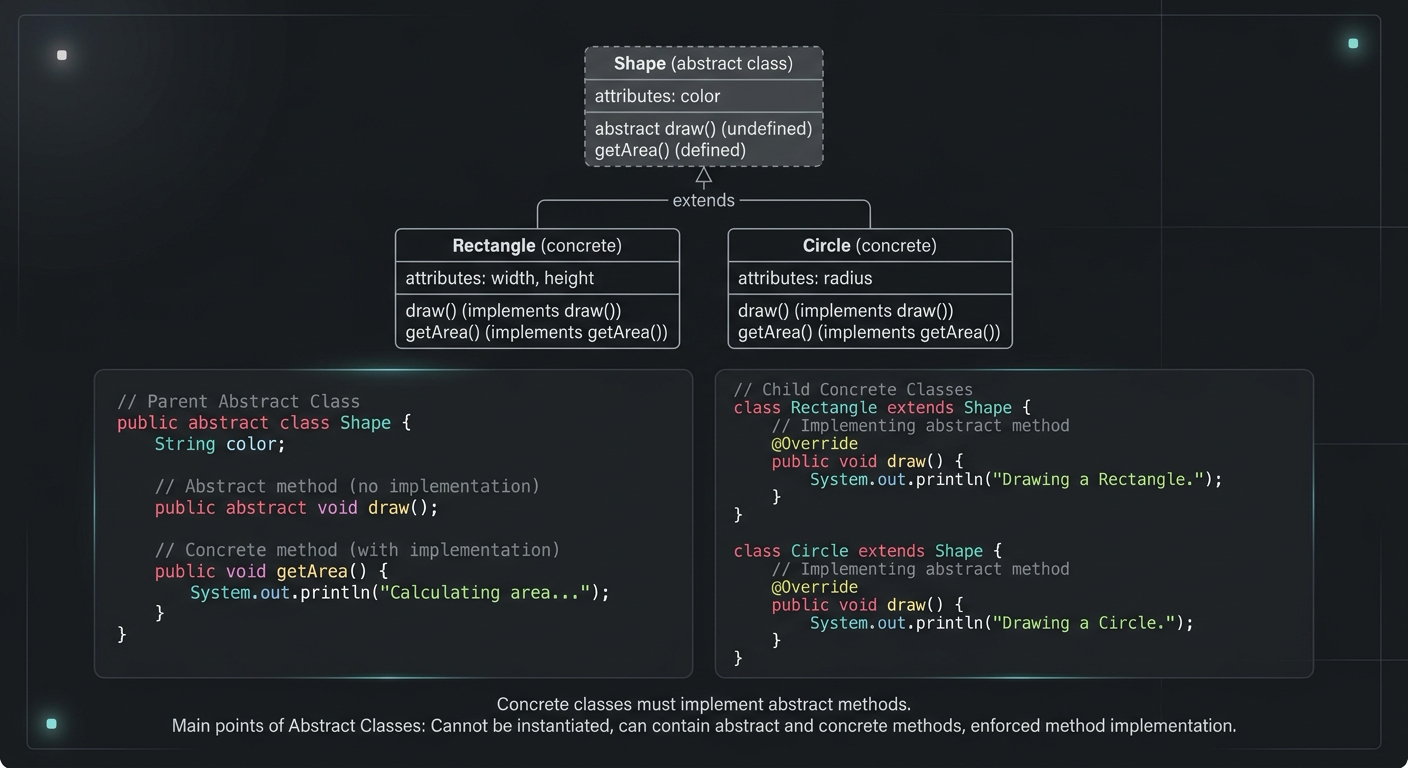
Abstract Class in Java (With Real-World Examples)
Abstract classes in Java are one of the most misunderstood OOP concepts. Here's a practical guide with real-world examples, code you can actually use, and the mistakes most devs make.
Your Career Transformation Starts Now
Join thousands of developers mastering in-demand skills with Amigoscode. Try it free today.